
Tread vs Toro TMS
For bulk and aggregate haulers moving off Toro TMS who want AI ticket reading, a driver app, and invoices from approved tickets.
Thanks. Now pick a time for your demo.
Your request is in. Choose a time below. If the calendar does not load, pick a time here. Want to talk sooner? Call 1-888-55-TREAD.
Thanks. We got your request.
Our support team will email you within one business day. Until then, the Tread Help Center shows how Tread works.
At a glance
Tread vs Toro TMS at a glance
Choose Tread if you haul aggregates and construction materials and want dispatch, AI ticket reading, invoicing, and QuickBooks sync in one system. Choose Toro TMS if you want month-to-month terms, text-only dispatch, or maintenance tracking inside your TMS.
| Feature | Tread | Toro TMS |
|---|---|---|
| Dispatch | ||
| Drag-and-drop dispatch board | Yes | Yes |
| Dispatch by text message | Or in the Tread app | Yes |
| Native driver app | iOS and Android | Text message |
| Tickets | ||
| Drivers send ticket photos | Yes | From a text link |
| AI reads the ticket | 95%+ accuracy | Photo upload |
| Billing and pay | ||
| Invoices from tickets | From approved tickets | From driver documents |
| Driver pay | Driver and hauler settlements | Pay rules on every load |
| QuickBooks Online and Desktop | Yes | Yes |
| Tracking and fleet | ||
| GPS and telematics | Motive, Samsara, and more | Samsara, Omnitracs, Geotab |
| Maintenance tracking | Not offered | Service intervals and alerts |
Compares Tread with Toro TMS as listed on Toro TMS’s public site, September 2026. Not listed means we could not find it there.
Tickets
AI reads the tickets your drivers send
Your drivers already photograph scale tickets. In Tread, AI reads each one. AI reads scale and material tickets with 95%+ accuracy. It returns the ticket number, date, quantity, unit, material, and truck.
AI checks each ticket’s quantity, date, and ticket number against the job, and flags the ones that need a look. Tread also flags potential duplicate tickets for review. Tread receives digital scale tickets from WEM, Astec, and Command Alkon, so tickets from those scales skip the photo step.
Your billing team reviews the flagged loads and approves the rest. Nobody retypes a ticket number from a photo.
Toro TMS collects ticket photos from drivers through a text link and attaches them to the load. In Tread, the numbers on that photo are read and checked before anyone approves the load.
See e-ticketing and AI ticket reading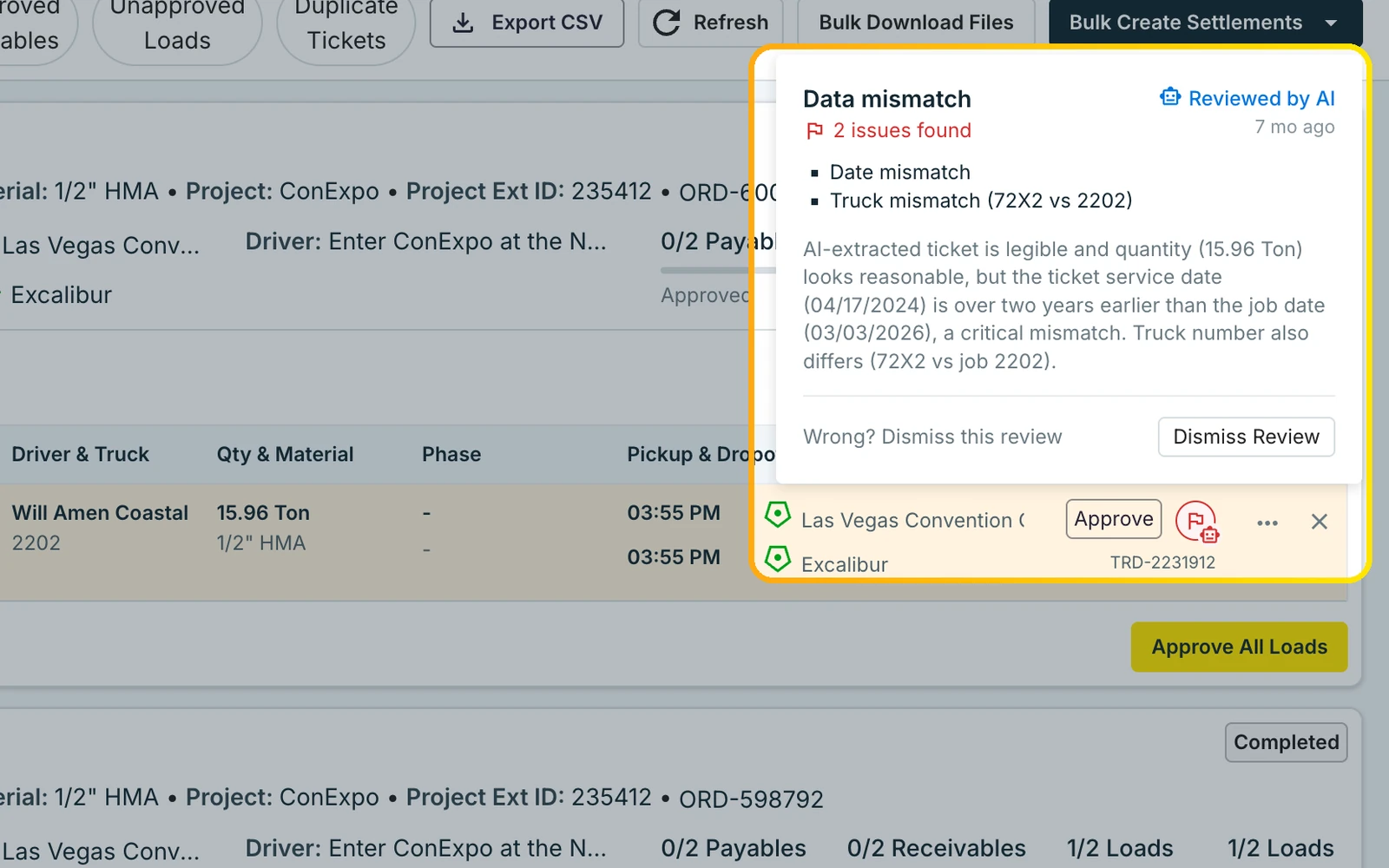
Drivers
A driver app, with text for drivers who skip it
Tread gives drivers, dispatchers, foremen, and admins native iOS and Android apps. Drivers get the job, capture tickets, and log time in one place. Foremen approve timesheets from their own phone. The driver app is in English, Spanish, and Punjabi.
Some drivers will never install another app. Drivers can get a job request by text and reply YES or NO. No app is needed for that step. Dispatchers and drivers message each other inside Tread.
Drivers without the app can still accept jobs by text, so you can move drivers onto the app at your own pace.
Toro TMS sends dispatches to drivers by text message. If text covers your whole operation, that is a simple setup. Tread keeps text for the drivers who want it and adds the app for everyone else.
See the Tread driver app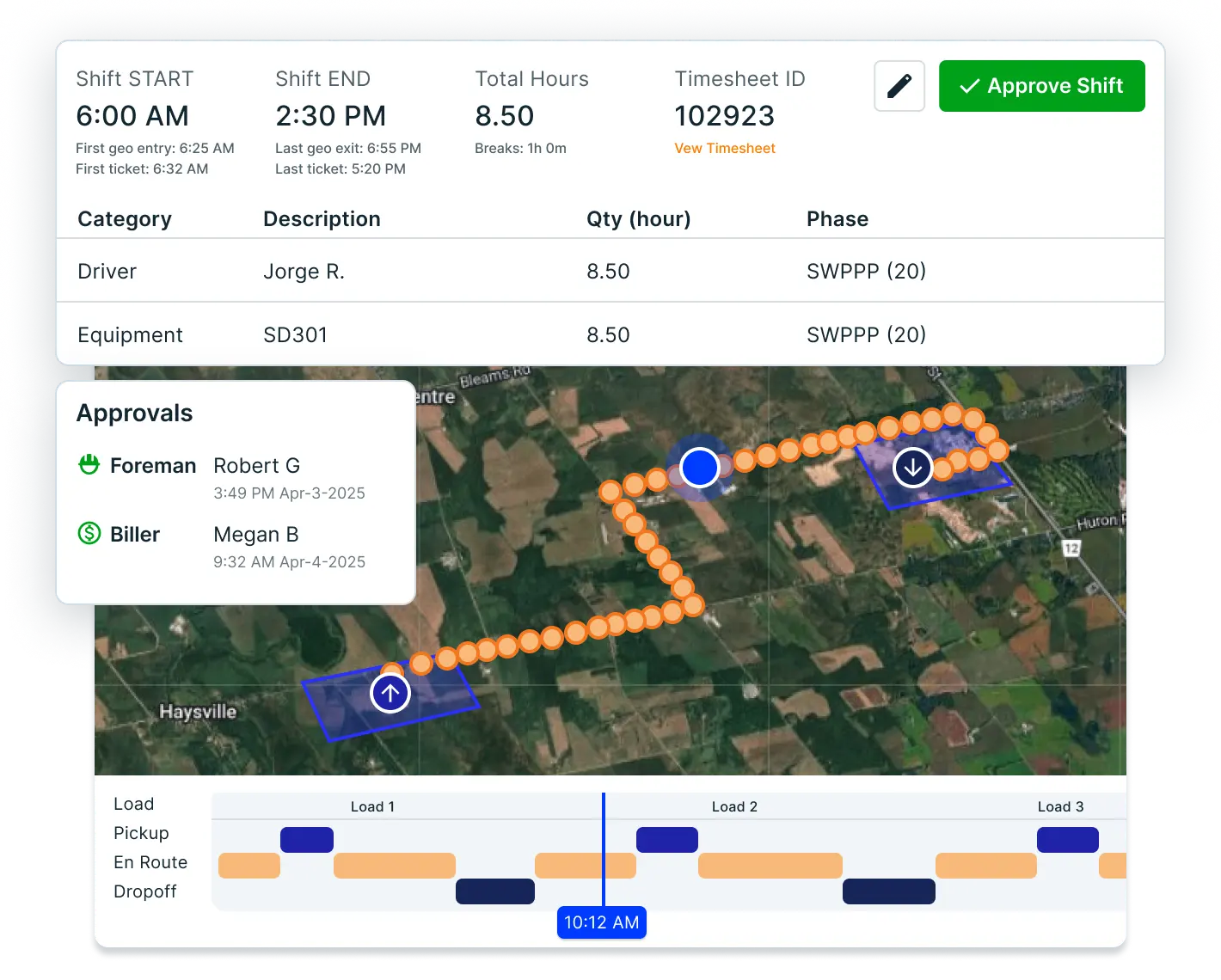
Billing
Approved tickets become invoices and settlements
In Tread, a load moves from dispatch to ticket to approval in one record. Approved tickets become customer invoices. Your own drivers and your sub-haulers get paid from the same numbers you bill.
Tread syncs with QuickBooks Online and QuickBooks Desktop. It exports approved settlements as QuickBooks invoices and bills.
Approved tickets and hours become driver and vendor settlements, with overtime and prevailing-wage rules applied. Customers on Tread can place orders, approve tickets, and track deliveries from their own Tread account. Each settlement comes with a PDF you can email.
Toro TMS also generates invoices from driver documents and applies driver pay rules to every load. It works with QuickBooks Online and Desktop too. Tread adds the AI ticket check before anything is billed.
See invoicing and hauler payments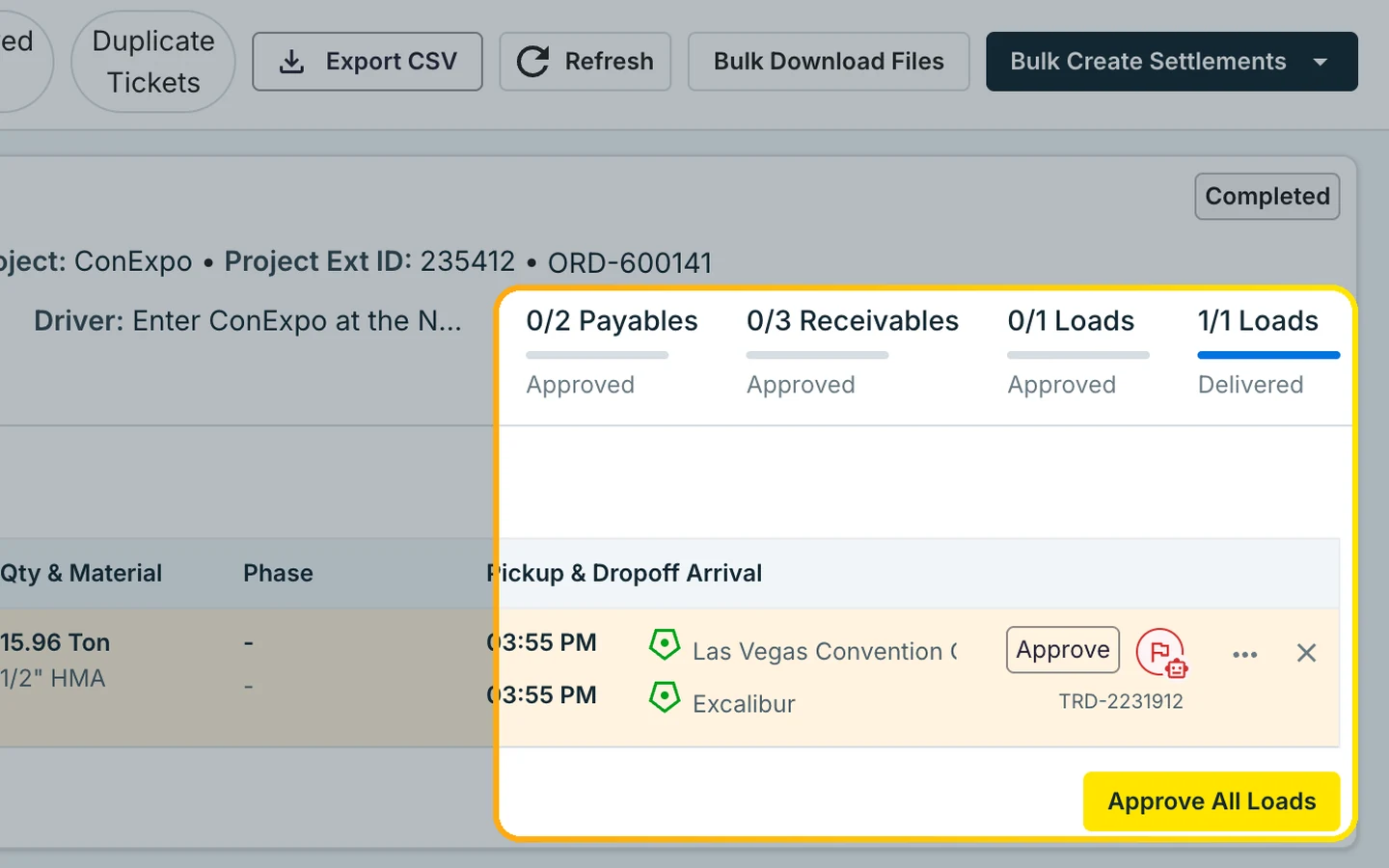
Fit
When Toro TMS may fit better
Pick the tool that fits your operation. Here is where each one falls short.
Toro TMS may suit you better if
- You want month-to-month terms.
- You don’t want a mobile app for your drivers.
- You want maintenance tracking inside your TMS.
Where Tread is not the fit
- Tread does not do LTL or long-haul freight. A job has one pickup and one drop-off.
- Tread does not offer ELD, DVIR, or equipment tracking.
- Tread starts with a demo, so a one- or two-truck carrier who wants to sign up online today may want another tool.
Reviews on G2
Customers who switched to Tread








“At this point in time it has outperformed any of our previous platforms and there is nothing that has negatively affected our operations.”
“This one originated for sand and gravel and those types of materials and you can tell the difference. The AI features eliminate the need for drivers to key everything in from each ticket and that has been a huge help not only to them, but in accuracy on our back office.”
Switching
Switching from Toro TMS
Tread can be live in as little as a day. How fast the whole fleet rolls out depends on its size.
We load your data
Trucks, sub-haulers, customers, materials, rates, and integrations go into Tread. You don’t re-enter them.
We train your team
Dispatch, billing, drivers, and sub-haulers train on the work they will do in Tread.
Free pilot on your live jobs
Run real loads through Tread before you switch over. You pick the go-live date.
FAQ
Toro TMS vs Tread FAQ
Can Tread replace Toro TMS?
For construction-materials hauling, yes. Tread covers orders, dispatch, the driver app, tickets, approvals, invoicing, and driver and hauler settlements in one system. Tread does not offer maintenance tracking today, so keep a separate tool for that.
How long does switching from Toro TMS take?
Tread can be live in as little as a day. How fast the whole fleet rolls out depends on its size. Our team can load your data and train your people for you, from dispatch to the driver app. Start with a free pilot on your live jobs. Book a demo to plan it.
Do we have to re-enter customers, rates, and sites?
No. Our onboarding team loads your trucks, sub-haulers, customers, materials, rates, and integrations into Tread for you. See how orders, dispatch, and integrations work once you are live.
Can we run both during the switch?
You set the go-live date with our team. Your data is loaded and your people are trained before that day, so you decide when dispatch moves over. A free pilot on your live jobs lets you test dispatch and AI ticket reading first. Book a demo to set it up.
Do drivers need a new app?
Not for every step. Drivers can get a job request by text and reply YES or NO. No app is needed for that step. The Tread driver app adds tickets, timesheets, and messaging with dispatch. See how text dispatch works.
How does Tread read tickets?
Drivers photograph printed or handwritten tickets. AI reads scale and material tickets with 95%+ accuracy and checks each one against the job. Tread receives digital scale tickets from WEM, Astec, and Command Alkon. See e-ticketing, AI load review, and ticket management.
Does Tread work with QuickBooks?
Yes. Tread syncs with QuickBooks Online and QuickBooks Desktop. It exports approved settlements as QuickBooks invoices and bills. Setup is per company, so ask your rep. See QuickBooks trucking software, invoicing and payments, and integrations.
Is Tread secure?
Tread is SOC 2 Type 2 certified. The report is available under NDA. Ask for it when you book a demo. Read how bulk haulers and material producers run Tread.
How is Tread priced?
See current plans on the pricing page. For a quote on your own loads, book a demo. The ROI calculator helps you size the work before the call.
See Tread next to Toro TMS
See how Tread handles dispatch, tickets, and QuickBooks billing on loads like yours.
Get my demo →