
Construction hauling software for your trucks and your sub-haulers.
Dispatch your own trucks and the haulers you call on one board. Capture each ticket with the load, and bill approved loads in QuickBooks.
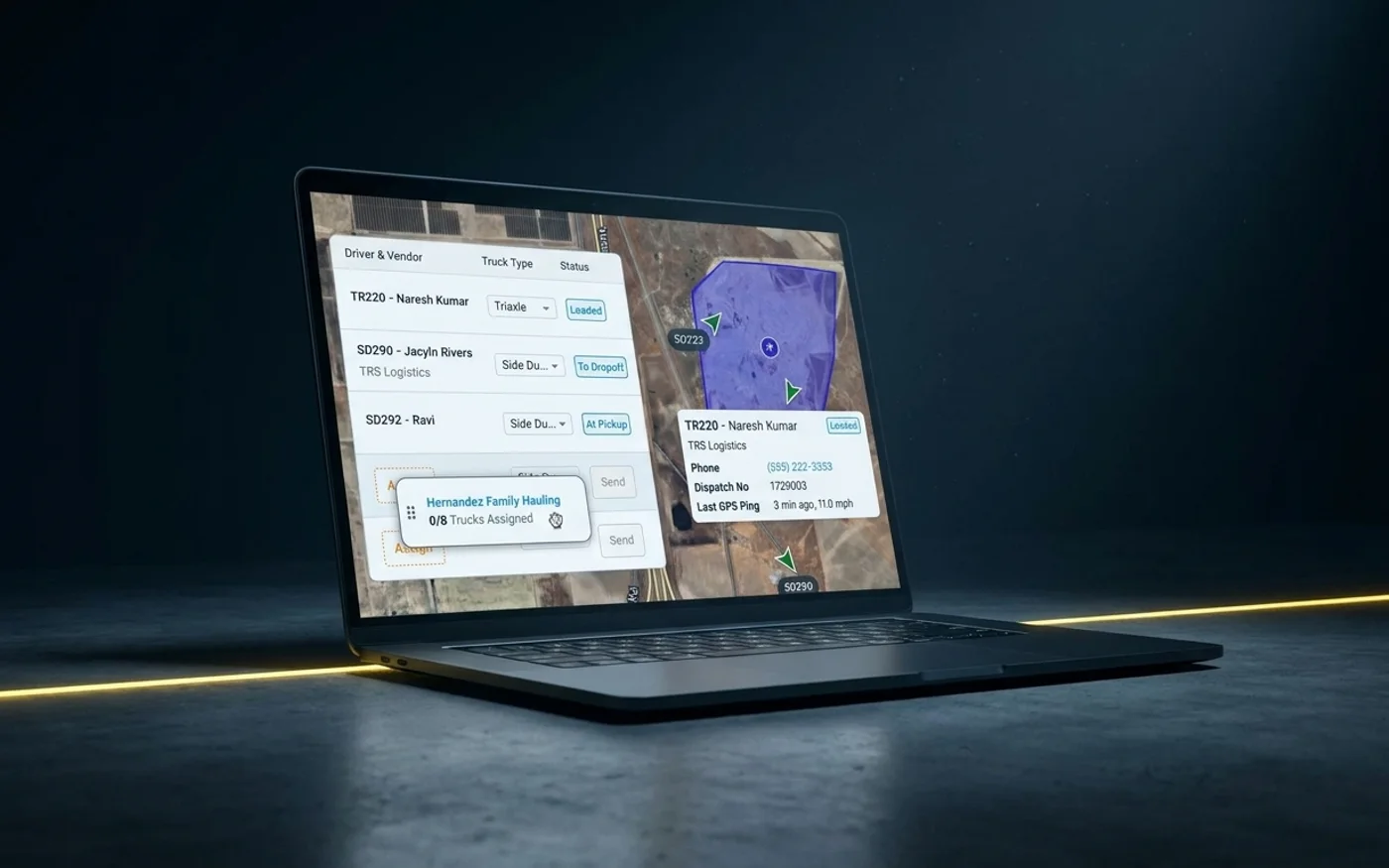
What is construction hauling software?
Construction hauling software dispatches the trucks that move dirt, aggregate, and asphalt. It collects the ticket for each load and turns approved loads into invoices and hauler pay. Tread does this for contractors and haulers who run their own trucks next to sub-haulers. Tread syncs with QuickBooks Online and QuickBooks Desktop.
What does construction hauling software do?
- Take the order: material, tons or loads, pickup, drop-off, and rate.
- Put trucks on it, from your own fleet and from the sub-haulers you call.
- Send each driver the job by app or by text.
- Track each truck on a live map, with arrival and departure times.
- Collect the scale ticket or timesheet with the load.
- Check the ticket against the job, then bill the customer and settle with the hauler.
Buyers also search for this as aggregate trucking software, construction trucking software, or hauling dispatch software. The job is the same: one record per load, from the order to the invoice.
Run mostly dump trucks? See dump truck dispatch software. Run point-to-point freight too? See trucking dispatch software for short-haul fleets.
Who is construction hauling software built for?
Tread is built for material producers, bulk haulers, and civil contractors. Here is where it fits and where another tool fits better.
| Best for | Not ideal for |
|---|---|
| Civil and site contractors who haul dirt, base, and fill with their own trucks plus sub-haulers | Long-haul or cross-country freight |
| Bulk haulers moving aggregate, sand, and asphalt on short hauls | Routes with more than one drop-off. Tread does not do LTL |
| Material producers who manage the trucking behind their sales | Fleets that want maintenance and DVIRs in the same tool. Tread does not track them, and it does not replace your ELD |
| Teams that bill by the ton, load, or hour and close the books in QuickBooks | One- or two-truck carriers who want to sign up online today. Tread starts with a demo |
| Companies that track hired trucks without installing GPS hardware | Buyers who need a marketplace to find trucks. Tread is not a load board |
Contractors can read how Tread works for contractors and for managing hired haulers. Haulers can start with Tread for bulk haulers.
From order to invoice
How does a load move from order to invoice?
Set the job up once
Save a repeat haul as a project and create each day’s orders from it. Rate cards, fuel surcharge schedules, and add-ons set pricing for each project.
Put every truck on one board
Drag and drop, click to assign, or bulk assign trucks on one board, for your own drivers, owner-operators, and sub-haulers.
Send the job
Drivers get the job in the Tread app. Drivers can get a job request by text and reply YES or NO. No app is needed for that step.
Track the haul
Live map with geofenced arrival and departure. Truck locations from 50+ telematics providers, including Motive, Samsara, and Geotab, through Catena Telematics.
Capture the ticket
AI reads printed and handwritten scale and material tickets from a photo and returns the ticket number, date, quantity, unit, material, and truck. Tread receives digital scale tickets from WEM, Astec, and Command Alkon.
Bill and settle
Approved tickets and hours become driver and vendor settlements, with overtime and prevailing-wage rules applied, and a settlement PDF you can email. Tread syncs with QuickBooks Online and QuickBooks Desktop.
Own trucks and sub-haulers
How do you run your own trucks and sub-haulers together?
Software only
Tread is software only. We don’t broker trucks, we don’t own trucks, and we don’t share your trucking relationships. Tread never competes with you for loads or trucks.
Free accounts for sub-haulers
Sub-haulers you work with join Tread for free.
Track hired trucks
Track hired and sub-hauler trucks from the driver’s phone. No GPS hardware to install.
Paperwork on file
Set your own compliance document types, such as an insurance certificate, W-9, or DOT number. Mark which are required for vendors, drivers, or trucks, add expiration dates, and get warned when one is missing or expired.
What Tread data shows
88%
Of companies on Tread dispatch both their own trucks and hired trucks. More than half rely on hired trucks for most loads.
About 8 in 10
Loads on Tread hauled by trucks the dispatching company does not own. Owner-operators haul about half of all loads, and other carriers haul the rest of the outside loads.
63%
Of arrivals on Tread are stamped automatically by geofence.
All customers on Tread, July to October 2026. Demo and test accounts excluded.
The median truck on Tread runs 4 loads per working day, and the busiest 10% run 8 or more.
All customers on Tread, July to October 2026. Demo and test accounts excluded.
How do tickets turn into invoices faster?
- AI checks each ticket’s quantity, date, and ticket number against the job, and flags the ones that need a look.
- Tread flags potential duplicate tickets (same ticket number on the same order) for review.
- Tread’s AI agent follows up by text with drivers who haven’t submitted tickets, and collects the photos.
- AI reads timesheets and checks start and end times, breaks, and net hours.
People still approve the loads. The checks put the problem tickets in front of them first, so the clean ones go to billing. See how trucking ticket management software checks each ticket, and how approved loads reach QuickBooks.
On public work, the ticket is the pay record. The Federal Highway Administration explains how e-ticketing tracks materials tickets, and scale tickets come from scales tested against NIST Handbook 44.
What a billing clerk told us
It took two to four days every week just to finish last week’s invoices. Billing was always about a week behind.
How does it compare with other tools?
Tread publishes this page. The table groups tools by the job they start from. Every fact about another product comes from that vendor’s own website, retrieved 2026-10-13. Many teams run more than one of these.
| Type of tool | What it does well | Where it stops | Examples (their words) |
|---|---|---|---|
| Paper tickets and spreadsheets | Costs nothing to start, and everyone knows how to use it. | Tickets get keyed by hand, and lost tickets surface at billing time. | None |
| Telematics and fleet tracking | Truck location, engine data, and driver logs. | Scale tickets and customer invoicing are not listed on the Geotab home page as of 2026-10-13. | Geotab calls itself a commercial telematics provider that helps organizations manage their fleets. |
| Hauler and material marketplaces | Finding extra trucks or dirt on short notice. | Built around their own network of haulers or material. | TRUX says it pays haulers weekly and invoices the customer. Soil Connect calls itself the marketplace for dirt and aggregates. |
| Construction ticketing and dump truck logistics | Digital tickets and hauler coordination across many parties. | Check accounting fit. QuickBooks is not listed on the Iron Sheepdog or DirtLogics home page as of 2026-10-13. | TruckIT lists AI OCR for paper tickets and a QuickBooks integration. Iron Sheepdog calls itself an all-in-one platform for dump truck logistics. DirtLogics calls itself construction trucking software for dispatch, tickets, and billing. |
| Bulk hauling TMS | Dispatch through invoicing for haulers. | Each is built around a hauler’s own back office. | Toro TMS says it is built for the dispatching and back-office work of bulk hauling, with QuickBooks Online and Desktop. Dump Truck Dispatcher says it is built for dump truck companies, with a one-click QuickBooks export. |
| Tread | Own trucks and sub-haulers on one board, AI ticket reading, and QuickBooks billing from the same load record. | Not a load board. No LTL, maintenance, DVIR, or native ELD. | Material producers, bulk haulers, and civil contractors. |
For a product-by-product view, read our dump truck dispatch software comparison.
What should you ask a construction hauling software vendor?
- Show me one of my jobs from order to invoice, with my own pit, dump site, and rate.
- How do sub-haulers who won’t install an app get the job and send the ticket?
- Who checks the tickets, and what does the software flag before billing?
- Which version of QuickBooks do you sync with, and what moves each way?
- Can I bill by the ton, the load, and the hour on the same job?
- What happens when a driver loses signal at the pit?
- What do you not do? Ask for the list in writing.
Hours of service belong to your ELD under 49 CFR Part 395, Subpart B. Drivers who won’t use an app can still take jobs and send tickets by text.
Limits
What does Tread not do?
- Tread is not a load board. It runs the work you already have.
- Tread does not do LTL. A job has one pickup and one drop-off.
- Tread does not replace your ELD. Connect your ELD or telematics provider through Catena.
- Tread does not track maintenance or DVIRs.
- Tread does not move money. You pay your haulers directly.
- Tread does not provide scales. It takes tickets from your scale system.
Moving material for the industry’s leading producers, haulers, and contractors











FAQ
Construction hauling software questions
What is construction hauling software?
It dispatches the trucks that move dirt, aggregate, and asphalt, collects the ticket for each load, and turns approved loads into invoices and hauler pay. Tread does all of this on one load record.
Is it the same as aggregate trucking software?
Mostly, yes. Aggregate trucking software, construction trucking software, and hauling dispatch software describe the same work: short hauls of bulk material, paid by the ton, load, or hour, with a ticket behind each load.
Can I dispatch my own trucks and sub-haulers together?
Yes. Your own drivers, owner-operators, and sub-haulers sit on one board. Sub-haulers you work with join Tread for free.
How do I track hired trucks?
Track hired and sub-hauler trucks from the driver’s phone. No GPS hardware to install. Truck locations can also come from telematics providers through Catena.
Does Tread work with QuickBooks?
Yes. Tread syncs with QuickBooks Online and QuickBooks Desktop, and exports approved settlements as QuickBooks invoices and bills. Setup is per company, so ask your rep.
Do drivers need the app?
Not for every step. Drivers can get a job request by text and reply YES or NO. No app is needed for that step. Drivers can text in ticket photos too.
Does Tread read paper tickets?
Yes. AI reads printed and handwritten scale and material tickets from a photo and returns the ticket number, date, quantity, unit, material, and truck.
How do I get started?
Book a demo. Tread’s team loads your data and trains your people before go-live. Free pilot on your live jobs.
By the Tread team. We make dispatch and billing software, so this page says where another tool fits better. Statements about Tread cover features Tread ships today.
- Geotab home page, retrieved 2026-10-13. https://www.geotab.com/
- TRUX home page, retrieved 2026-10-13. https://www.truxnow.com/
- Soil Connect home page, retrieved 2026-10-13. https://www.soilconnect.com/
- TruckIT home page, retrieved 2026-10-13. https://www.truckit.com/
- Iron Sheepdog home page, retrieved 2026-10-13. https://www.ironsheepdog.com/
- DirtLogics home page, retrieved 2026-10-13. https://www.dirtlogics.com/
- Toro TMS pricing page, retrieved 2026-10-13. https://www.torotms.com/pricing
- Dump Truck Dispatcher home page, retrieved 2026-10-13. https://www.dumptruckdispatcher.com/
- Federal Highway Administration, e-Ticketing. https://www.fhwa.dot.gov/innovation/everydaycounts/edc_6/eticketing.cfm
- NIST Handbook 44, Specifications and Tolerances for Weighing and Measuring Devices. https://www.nist.gov/pml/owm/nist-handbook-44-current-edition
- eCFR, 49 CFR Part 395, Subpart B: Electronic Logging Devices. https://www.ecfr.gov/current/title-49/subtitle-B/chapter-III/subchapter-B/part-395/subpart-B
Keep exploring
Related reading
- Dump truck dispatch software →
- Trucking dispatch software for short-haul fleets →
- Best dump truck dispatch software, compared →
- Trucking software that integrates with QuickBooks →
- Trucking ticket management software →
- Tread for contractors →
- Managing hired haulers as a contractor →
- Tread for bulk haulers →
See your trucks and sub-haulers on one board.
Book a demo to see dispatch, AI ticket reading, and QuickBooks billing on a job like yours.
Get a demo →Last updated