
Dump truck dispatch software for bulk hauling.
Put company trucks, owner-operators, and sub-haulers on one board. Send loads by app or text, capture every scale ticket with the load, and invoice the loads you ran.
What is dump truck dispatch software?
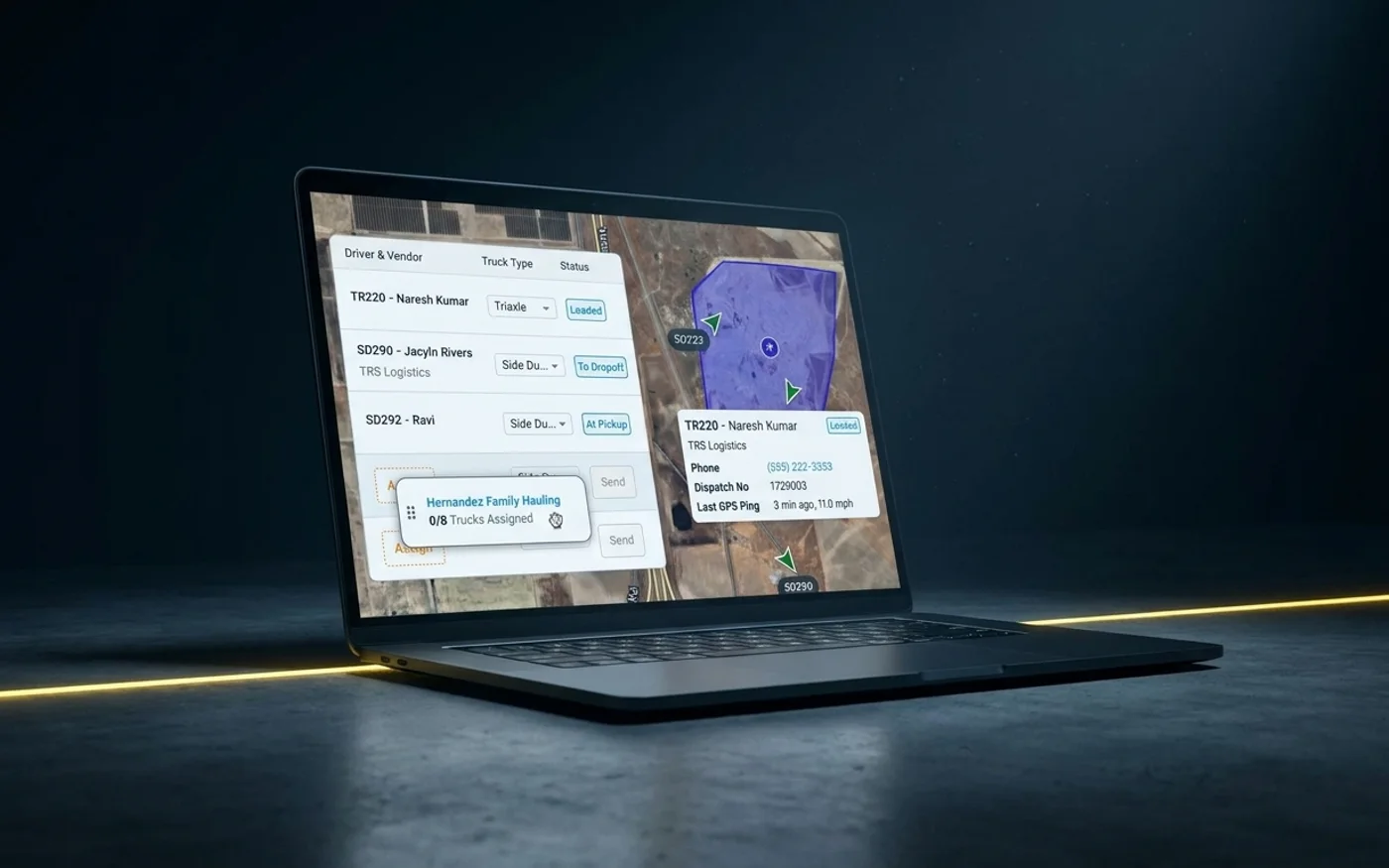
Dump truck dispatch software assigns trucks to hauling jobs, sends drivers their loads, and tracks each load until it is delivered. Tread also captures the scale ticket with each load, checks it with AI, and turns approved loads into invoices and hauler settlements.
Is Tread the right fit?
| Best for | Not ideal for |
|---|---|
| Bulk haulers running their own trucks alongside sub-haulers | Long-haul freight. Tread does not do LTL or multi-stop freight. |
| Material producers scheduling company and third-party trucks | Jobs with more than one stop. A job has one pickup and one drop-off. |
| Civil contractors who hire trucks and need the tickets | Finding new hauling work. Tread is not a load board. |
| Aggregate, asphalt, dirt, grain, and fertilizer hauling | Companies that want to sign up online without a demo |
26 min
Median active time for a dispatcher to build tomorrow’s schedule, for about 24 jobs.
Active time in Tread only, so a lower bound.
9 in 10
Dispatched drivers active in the Tread driver app.
90.9% of dispatched drivers, Sep 13 - Oct 3 2026.
8 in 10
Dispatches that carry driver, truck, material, pickup, drop-off and quantity.
84.3% of dispatched jobs, Sep 13 - Oct 3 2026.
SOC 2 Type 2
Certified.
Figures from Tread production data, July to October 2026. SOC 2 Type 2 is Tread’s certification.
How does Tread dispatch dump trucks?
Most dump truck work repeats. The same pit, the same job, the same material, day after day.
Save a repeat haul as a project and create each day’s orders from it. Rate cards, fuel surcharge schedules, and add-ons set pricing for each project.
Drag and drop, click to assign, or bulk assign trucks on one board, for your own drivers, owner-operators, and sub-haulers. Tri-axles, end dumps, side dumps, and belly dumps all sit on the same screen.
When a job changes at 6 am, move the load to another truck. The driver gets the update on their phone.
Live map with geofenced arrival and departure. You see loads per truck and cycle times without calling drivers.
The median truck on Tread runs 4 loads per working day, and the busiest 10% run 8 or more.
All customers on Tread, July to October 2026. Demo and test accounts excluded.
An aggregate broker’s 6 am
The trucks go out at 6. By start time, about 1 in 5 isn’t at the pit. The ops lead told us they need to know which ones by 7, so the office can call in replacements.
Can I dispatch sub-haulers and owner-operators?
Yes. Most dump truck fleets lean on trucks they do not own.
About 8 in 10 loads on Tread are hauled by trucks the dispatching company does not own. Owner-operators haul about half of all loads, and other carriers haul the rest of the outside loads.
All customers on Tread, July to October 2026. Demo and test accounts excluded.
- Sub-haulers you work with join Tread for free.
- Drivers can get a job request by text and reply YES or NO. No app is needed for that step.
- Track hired and sub-hauler trucks from the driver’s phone. No GPS hardware to install.
- Drivers can text in ticket photos.
Tread is software only. We don’t broker trucks, we don’t own trucks, and we don’t share your trucking relationships.
What a hauler told us
Every truck started its app at 5 am and hit the plant gate at the same time, and some didn’t load until 7:30. Staggering trucks every 15 minutes keeps the line moving.
Tickets to invoices
How does Tread handle scale tickets?
Capture the scale ticket with the load
Drivers photograph the ticket in the app or text it in. AI reads printed and handwritten scale and material tickets from a photo, with 95%+ accuracy, and returns the ticket number, date, quantity, unit, material, and truck.
Approve tickets and hours
AI checks each ticket’s quantity, date, and ticket number against the job, and flags the ones that need a look. Tread flags potential duplicate tickets (same ticket number on the same order) for review. Foremen approve digital timesheets, with cost and phase codes on every hour.
Invoice and settle from the same record
Approved tickets and hours become driver and vendor settlements, with overtime and prevailing-wage rules applied, and a settlement PDF you can email. Invoices carry the ticket for every line, and approved settlements export to QuickBooks.
What customers tell us about ticket numbers
A ticket number is not an ID. Two plants can print the same number on the same day, so a duplicate check has to compare plant, date and tons too.
What customers tell us about timesheets
A contractor told us checking timesheets took 9 to 10 hours a day across two offices. Now it takes about one.
How do dump truck dispatch tools compare?
Tread publishes this page. Every fact about another product comes from that vendor’s own website, retrieved 2026-10-11. Where a vendor does not publish something, the cell says so.
| Software | Built for (their words) | Sub-haulers | Tickets | Accounting |
|---|---|---|---|---|
| Tread | Material producers, bulk haulers, and civil contractors | Own drivers, owner-operators, and sub-haulers on one board. Sub-haulers join free. | AI reads printed and handwritten scale and material tickets from a photo | QuickBooks Online and QuickBooks Desktop |
| Dump Truck Dispatcher | “built specifically for dump truck companies” | Subcontractor portal for lease haulers to accept jobs and add trucks | System tickets matched against quarry tickets to catch missing ones. Photo reading is not listed on their public site as of 2026-10-11. | Invoice export “to QuickBooks or other accounting systems” |
| TruckIT | Contractors, haulers, producers, agencies, and brokers | Dispatch module for available drivers | AI-powered OCR for paper tickets, plus GPS-verified e-tickets with signatures | QuickBooks and NetSuite among listed integrations |
| Toro TMS | Bulk hauling dispatch and back office | Dispatches sent by text | Drivers add documents from their phone, and an invoice is generated | QuickBooks Online and QuickBooks Desktop. Offers month-to-month contracts. |
Sources, each retrieved 2026-10-11:
- Dump Truck Dispatcher: https://www.dumptruckdispatcher.com/
- TruckIT: https://www.truckit.com/
- Toro TMS: https://www.torotms.com/
- Tread: https://docs.tread.ai/
Want TRUX and FleetWatcher too? Compare six dump truck dispatch tools, with a source for every claim.
Integrations
Which systems does Tread work with?
Scale systems
Tread receives digital scale tickets from WEM, Astec, and Command Alkon. Setup goes through the Tread team.
Accounting
Tread syncs with QuickBooks Online and QuickBooks Desktop. It pulls in your customers, vendors, items, accounts, payment terms, and tax rates, and exports approved settlements as QuickBooks invoices and bills.
Telematics
Truck locations from 50+ telematics providers, including Motive, Samsara, and Geotab, through Catena Telematics.
The Tread driver app
Native iOS and Android apps for drivers, dispatchers, admins, and foremen. The driver app is in English, Spanish, and Punjabi.
Limits
What does Tread not do?
- Tread is not a load board. It runs the loads you already have.
- Tread does not replace your ELD. Connect your ELD or telematics provider through Catena.
- Tread does not track maintenance or DVIRs.
- Tread does not provide scales. It takes tickets from your scale system.
- Tread does not move money. You pay your haulers directly from the settlement Tread builds.
- Tread does not do LTL or multi-stop freight. A job has one pickup and one drop-off.
More on dump truck dispatch
- How a dispatch day runs. Our guide to dump truck dispatching covers loads per truck, who hauls the loads, and how often plans change.
- Bulk haulers. See how bulk haulers run their own trucks and sub-haulers on Tread.
- TMS or dispatch? Start with what a TMS for trucking does.
- E-ticketing. Digital tickets capture the weight, GPS, and timestamp data that state e-ticketing programs ask for. See how the Federal Highway Administration describes e-ticketing for materials tickets, and our state DOT e-ticketing guide.
- Scales. Commercial scales are tested against NIST Handbook 44. Tread takes the ticket your scale prints. See how trucking ticket management software carries it to the invoice.
- QuickBooks. See what syncs each way on trucking software that integrates with QuickBooks.
- Hours of service. They belong to your ELD under 49 CFR Part 395, Subpart B. Connect your ELD or telematics provider through Catena.
Moving material for the industry’s leading producers, haulers, and contractors











Proof
What dispatchers and operators say
“We used to spend half our day dealing with paper tickets. With Tread, every ticket is digital, every load is tracked, and we invoice the same day.”
SchlondaDispatcher · Rhino Trucking“Prior to Tread we were 2 weeks out from invoicing. We had to wait for tickets from the week prior, collect and sort them, verify and create or scan invoices. It was literally an 8-foot table of paperwork EVERY WEEK to deal with and to have to retain and file. Fast forward to today, no paperwork, 8-foot table is thrown away, and we can invoice the next day. THAT is streamlined time management.”
 Jeff BuerskenSales/Estimator · Rock On Trucks
“Having worked in the trucking industry for more than 37 years, I will say, Tread has been a much appreciated asset. We need to embrace change and work together to help build what’s next.”
 Tom DesarmiaConstruction Dispatcher · Tomlinson
FAQ
Dump truck dispatch software questions
What is dump truck dispatch software?
Dump truck dispatch software assigns trucks to hauling jobs, sends drivers their loads, and tracks each load until it is delivered. Tread also captures the scale ticket with each load, checks it with AI, and turns approved loads into invoices and settlements.
What software do dump truck dispatchers use?
Most start with a whiteboard, group texts, and spreadsheets. Dispatch software puts trucks, loads, and tickets in one place. The comparison table on this page shows how four dump truck dispatch tools differ.
How much does dump truck dispatch software cost?
It depends on how many loads you run and what you need. Book a demo and we’ll walk through it with your loads.
Can I dispatch owner-operators and subcontracted haulers?
Yes. Your own drivers, owner-operators, and sub-haulers sit on the same board. Drivers can get a job request by text and reply YES or NO. No app is needed for that step.
Can I track hired trucks without installing hardware?
Yes. Live location and geofenced arrival and departure come from the Tread driver app, on the phones drivers already carry. Fleets with telematics can connect their provider instead, from 50+ providers through Catena Telematics.
How do I stop paper tickets from getting lost or billed twice?
Drivers photograph each ticket in the app or text it in, so it lands on the load it came from. AI reads the ticket and checks it against the job. Tread flags potential duplicate tickets (same ticket number on the same order) for review before anything is billed.
What happens when a driver loses signal?
The driver app keeps working without signal. Logs, locations, and ticket photos save on the phone and sync when it reconnects. New dispatches still need a connection.
How does Tread connect to QuickBooks?
Tread syncs with QuickBooks Online and QuickBooks Desktop. It pulls in your customers, vendors, items, accounts, payment terms, and tax rates, and exports approved settlements as QuickBooks invoices and bills. Setup is per company, so ask your rep.
Can I find new hauling work on Tread?
No. Tread is not a load board. It runs dispatch, tickets, and billing for the hauling work you already have, with your own trucks and the haulers you hire.
How long does it take to move off spreadsheets and group texts?
Tread can be live in as little as a day. How fast the whole fleet rolls out depends on its size. Our team can load your data and train your people for you.
Keep exploring
Related reading
- Dump truck dispatch software for bulk haulers →
- Dispatching hired haulers for contractors →
- Scheduling and dispatch →
- E-ticketing and AI ticket reading →
- Invoicing and settlements →
- Dispatch drivers by text, no app for that step →
- Compare six dump truck dispatch tools →
- Tread vs FleetWatcher →
- How dump truck dispatching works, with data →
- What is a TMS for trucking? →
- Trucking dispatch software for short-haul fleets →
- Dispatch software for truckload (FTL) carriers →
- Trucking software for small carriers and owner-operators →
- Dispatch software for freight brokers →
- Dispatch for point-to-point drayage moves →
See your dispatch board in Tread.
Book a demo to see dispatch, AI ticket reading, and invoicing on loads like yours.
Get a demo →Last updated